
Omarchy plugin
In this chapter
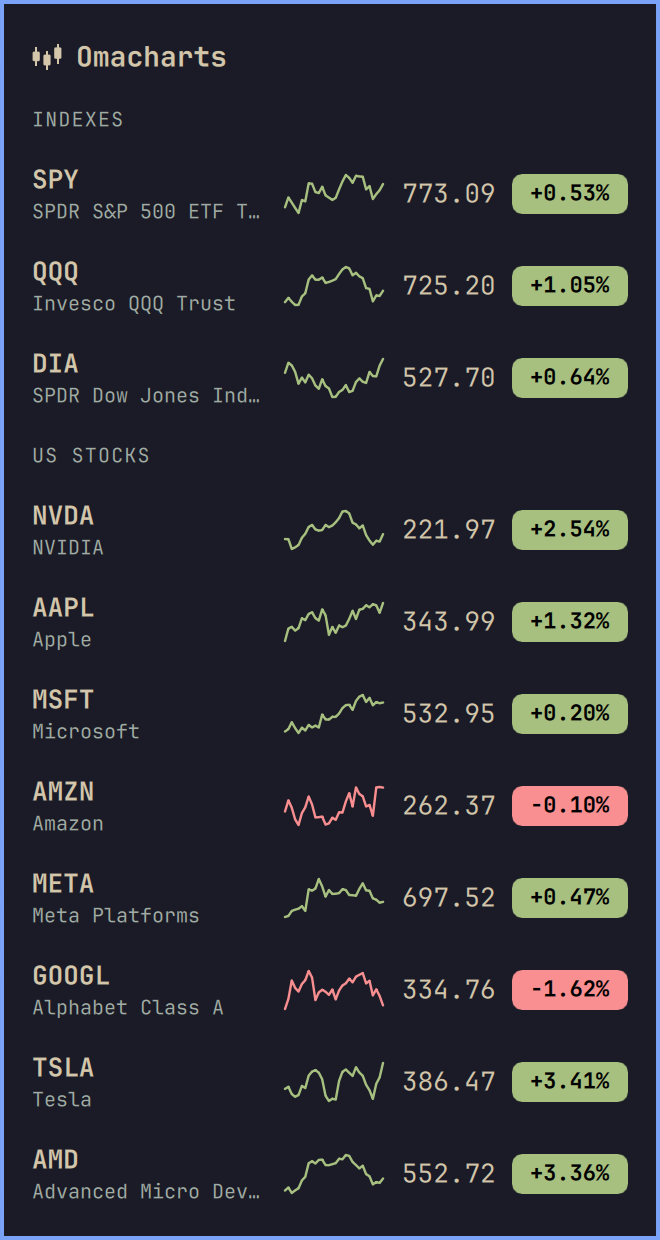
The Omarchy plugin puts your default watchlist in the Omarchy bar. It is an icon on the right of the bar, with a panel under it that shows a price, a change and a sparkline for every symbol. A click on a row brings the Omacharts window to that symbol. The plugin works while the window is closed.
What it shows
The icon in the bar takes the bar’s own colour. Its tooltip is the first
symbol that has a quote, with its change (SPY +0.54%), or Updating the
watchlist while the quotes refresh.
The panel lists the default watchlist section by section, leaving out empty sections. Each row has:
| Part | Shows |
|---|---|
| Ticker and name | The symbol, and the instrument’s name under it, cut short when long. |
| Sparkline | The last 30 daily closes, in the colour of today’s move. |
| Price | The last price, with as many decimals as the instrument needs (two for a stock, five for most currency pairs) and its thousands marked (81,373.44). A dash until there is one. |
| Change | The move since the previous close as a percentage, on a pill in the up or down colour. |
Colours come from the desktop theme, even when the window is on another theme. Whether a rise is green or red follows the Colouring chosen in the window (Colouring). A theme switch recolours the panel at once. A spinner beside the title turns while quotes refresh. If the last refresh failed, the error is written under the title and the last good quotes stay on screen. An empty list says Nothing on the watchlist yet. A long list scrolls.
Using it
| Gesture or key | Does |
|---|---|
| Click the icon | Opens or closes the panel. |
| Right-click or middle-click the icon | Refreshes the quotes now. |
| Click a row | Brings the window up on that symbol, and closes the panel. |
| Click Omacharts | Brings the window up as it is, and closes the panel. |
| ↑ ↓ | Moves the highlight. So does the pointer. |
| Enter | Opens the highlighted symbol. |
| R | Refreshes the quotes now. |
| Esc | Closes the panel. |
A click on a row selects the symbol as a click in the sidebar would, in the chartbook that shows the default watchlist. If none does, the open chartbook shows it. With no window open, it opens one. When the focused chart is pinned and no chart follows the watchlist, the symbol is not shown. See Linking charts to the watchlist.
Refreshing
The plugin refreshes its quotes every two minutes. A change to the watchlist reaches the bar at once while the window is open, otherwise at the next refresh.
The interval can be 30 to 1800 seconds, in steps of 30, and is changed from a terminal:
omarchy bar set omacharts.watchlist refreshIntervalSec 300
Putting it in the bar
The first launch on an Omarchy desktop puts the plugin in the bar. If you take it out, it stays out.
Preferences › General › Desktop › Show in the Omarchy bar adds or removes the plugin. If that fails, the row says why and the switch goes back. The group only appears on a desktop with an Omarchy bar. After an upgrade, the plugin updates the next time the window opens.