
The Trading panel
In this chapter
The Trading panel sits under the charts once there is a login (Trading services). It shows every account of every login at once, whichever chart is focused.
Trading is experimental (Beta). Nothing in the panel asks before it acts.
Open it with the Trading toggle in the window’s bottom-right corner (at the right end of the chartbook strip when there are several chartbooks), or with the key of a tab. The same key again closes it while that tab is in front. Whether it is open is remembered.
| Key | Tab |
|---|---|
| Ctrl + Shift + A | Accounts |
| Ctrl + Shift + P | Positions |
| Ctrl + Shift + O | Orders |
While there is a Rithmic login, Rithmic’s logos are in the panel’s tab bar.
Accounts

| Column | Shows |
|---|---|
| Account | Which account |
| Currency, Balance | As the trading service reports them |
| Day P&L, Open P&L | The day’s profit or loss, and that of what is held now |
| Loss limit, Liquidates at | The limits a prop firm sets, when the trading service reports them |
Positions
Each contract held, per account. Flatten on a row closes it at the market, and leaves the contract’s working orders alone.

| Column | Shows |
|---|---|
| Account, Contract | Which account holds which contract |
| Qty | How many, negative when short |
| Average | The average price they were opened at |
| Open P&L | The profit or loss of what is held now |
Orders
The day’s orders. Open shows the orders still working, and All the whole day’s, filled and cancelled too. Cancel on a row cancels that order. Cancel all · account, at the right of every tab, cancels every working order on the default account, which it names, and is greyed out when none is working.
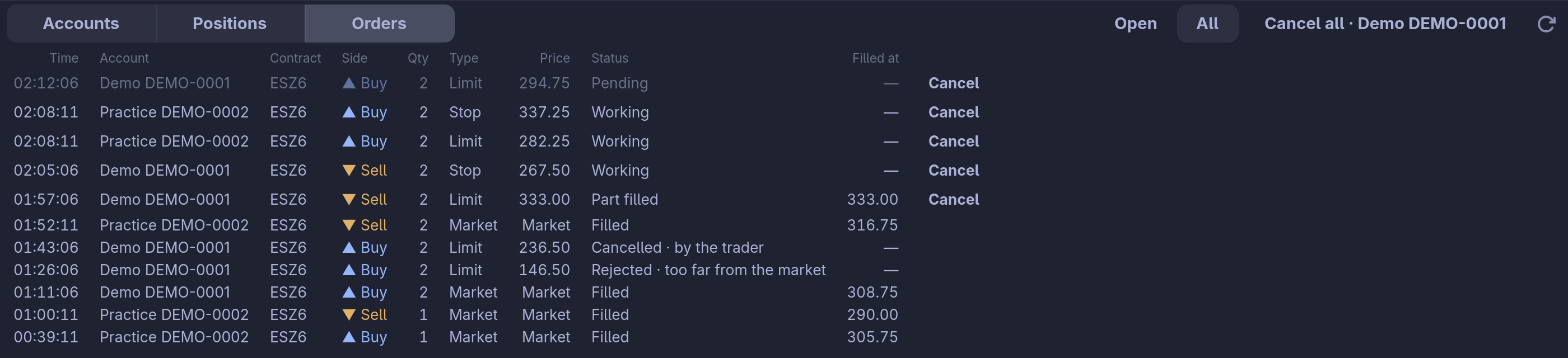
| Column | Shows |
|---|---|
| Time, Account, Contract | When it was sent, on which account, for which contract |
| Side, Qty, Type, Price | Buy or Sell, how many, Market, Limit or Stop, and at what price |
| Status | Pending, Working, Part filled, Filled, Cancelled or Rejected. A pending order, sent but not yet answered, is dimmed |
| Filled at | The price it filled at |
From the CLI
omacharts trading accounts, positions and orders --all print the same tables, and --json gives them as fields. trading flatten ESZ6 and trading cancel --all do what the buttons do (The CLI › Trading).