
Where your data lives
In this chapter
Everything you make in Omacharts is saved as you go and backed up automatically.
Where everything is
| Path | What it holds |
|---|---|
~/.local/share/omacharts/omacharts.db |
Everything you made. The file to copy to another machine. |
~/.local/share/omacharts/market.db |
Downloaded prices. |
~/.local/share/omacharts/backups/ |
Automatic copies of omacharts.db. |
~/.config/omacharts/tos.env |
The thinkorswim session (Market data feeds). Deleting it signs you out. |
~/.config/omacharts/tos-browser/ |
The browser profile the thinkorswim sign-in uses. Deleting it makes the next sign-in start from scratch. |
~/.config/omarchy/plugins/omacharts.watchlist/ |
The Omarchy plugin (Omarchy plugin). |
~/.claude/skills/omacharts, ~/.codex/skills/omacharts |
The agent skill, as links to /usr/share/omacharts/agents/skills/omacharts (The agent skill). |
<Pictures>/Omacharts/ |
Screenshots, unless another folder is chosen (Screenshots). |
Backups
A backup of omacharts.db is taken when the window opens and every hour after, when something has changed since the last one. Downloaded prices are not included.
| Period | Kept |
|---|---|
| The last 24 hours | One copy per two hours |
| The seven days before | One copy per day |
| In all | At most twenty |
A backup is named for when it was taken, in UTC (settings-20261021-140307.db). The app shows the time in local time.
In Preferences
Preferences › Data › Backups:
| Control | Does |
|---|---|
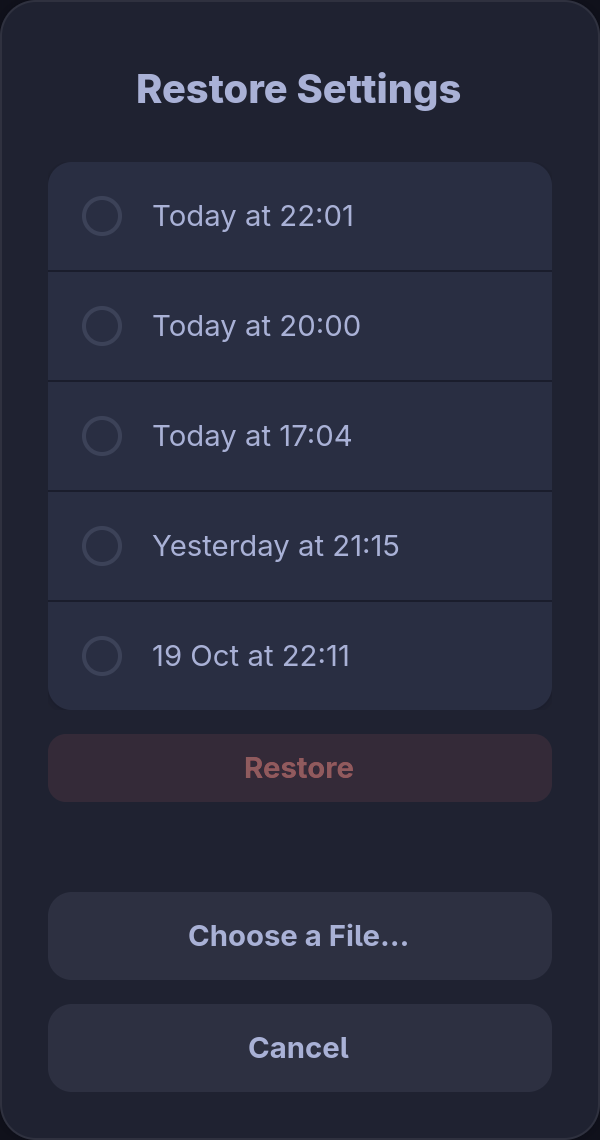
| Last backup | When the newest backup was taken and how many are kept, Today at 22:01 · 5 kept. None yet before the first. |
| Back Up Now | Takes a backup now. With nothing changed since the newest, the row says Nothing changed since the last backup and keeps nothing. |
| Restore… | Opens Restore Settings, which lists every backup, newest first, by when it was taken. Pick one and press Restore. Choose a File… restores from a file instead, such as another machine’s backup or its omacharts.db. Greyed out while there are no backups. |
Restoring
A restore takes effect at once, even in an open window. The charts, the sidebar and the theme become the restored ones, and Preferences closes. What it replaces is backed up first, so restoring that backup undoes it. A file from an older Omacharts restores as usual. A file from a newer Omacharts is refused until you upgrade, and a file that is not Omacharts settings is refused; either way nothing changes. The settings that stay with this machine are kept (Preferences).
Moving to another machine
| To move | Do |
|---|---|
| Everything | On the other machine, Preferences › Data › Restore… › Choose a File… and pick a copy of omacharts.db or any file from backups/. |
| Everything, before the first launch | Put omacharts.db in ~/.local/share/omacharts/ on a machine that has never run Omacharts. |
| Watchlists only | Export them on this machine and import them on the other with the CLI. Importing adds to that machine’s lists rather than replacing them (Watchlists and sections in the CLI). |
None of these carries the thinkorswim session. Sign in again on the other machine.
Downloaded prices
Downloaded prices are kept on this machine, up to a limit. Past it the oldest are dropped, and at once when you lower the limit.
Preferences › Data › Storage:
| Control | Does |
|---|---|
| Cached data | How many series are kept, the space they take, the limit and the share used, 16 series · 3.2 MB of 1 GB · 1%. |
| Clear | Deletes every downloaded series. Charts download their prices again. |
| Keep at most | The limit: 256 MB, 512 MB, 1 GB (the default), 2 GB or 5 GB. There is no unlimited setting. |
Starting over
Quit Omacharts, then delete what you want gone:
| To forget | Delete |
|---|---|
| Everything you made, the downloaded prices and the backups | ~/.local/share/omacharts/ |
| Only the downloaded prices | Preferences › Data › Storage › Clear, or market.db with the app closed |
| The thinkorswim session and browser profile | ~/.config/omacharts/ |
| The Omarchy plugin | Preferences › General › Show in the Omarchy bar, off |
The next launch starts like a first one, with the default watchlist, one chart and, on an Omarchy desktop, the Omarchy plugin back in the bar. Uninstalling the package removes none of this. See Installation.