
Session times
In this chapter
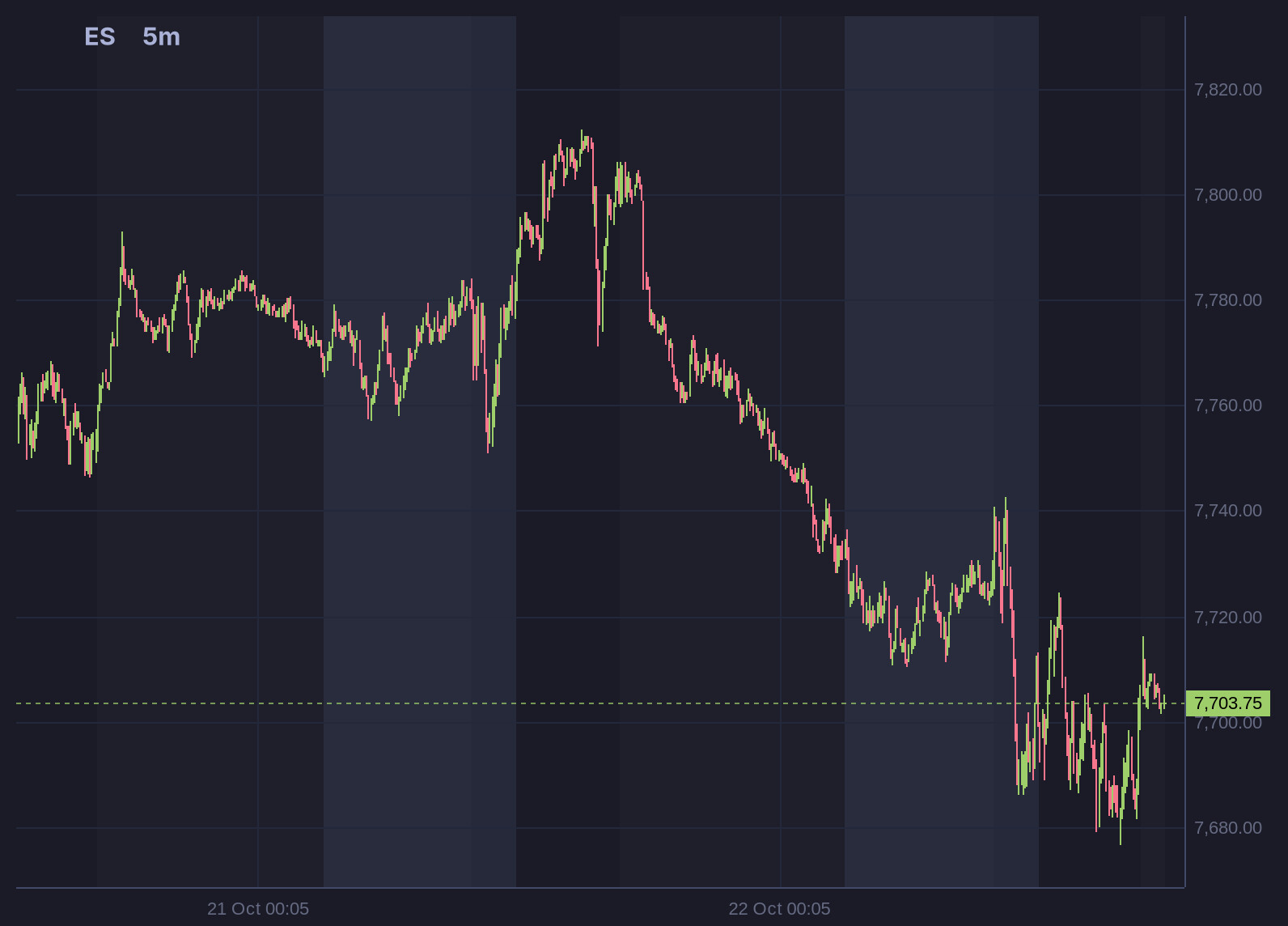
Session Times shades stretches of each day behind the bars, across the price plot and every strip. It holds a list of ranges. Two follow the trading day of the chart’s exchange, ETH for the extended hours and RTH for the regular session. The rest are hours of the clock, such as the London session. It draws no lines and no labels. It is the only indicator in the Sessions and time family.
| Drawn | Legend | Type to add | CLI |
|---|---|---|---|
| Behind the bars | Sessions · ETH, London, once it is in the legend | sessions |
session_times |
The Default chart template holds Session Times with ETH, so a chart on it shows the extended hours set apart from the regular session.
The trading day
Every instrument trades on an exchange, and the exchange keeps its own clock and its own trading day. A day is split into parts:
| Part | Is |
|---|---|
| Regular hours | The main session, the one a chart on Regular hours only keeps. Shortened to RTH |
| Pre-market | Before the regular session, on markets that have one |
| Post-market | After the regular session |
| Overnight | On futures, from the start of the trading day to the regular session |
Everything outside the regular session is extended hours, shortened to ETH.
Some examples, in New York time where the exchange is in the US:
| Market | Trading day | Regular hours |
|---|---|---|
| US stocks and ETFs | 04:00 to 20:00 | 09:30 to 16:00 |
| Equity index futures such as ES and NQ (CME Globex) | 18:00 the evening before to 17:00 (17:00 to 16:00 Chicago time) | 09:30 to 16:00, the cash session |
| Crude oil (NYMEX) | 18:00 the evening before to 17:00 | 09:00 to 14:30 |
| Gold (COMEX) | 18:00 the evening before to 17:00 | 08:20 to 13:30 |
| Madrid | 09:00 to 17:30 Madrid time | |
| Tokyo | 09:00 to 11:30 and 12:30 to 15:30 Tokyo time, with the lunch break left out | |
| FX | Round the clock from 17:00 New York time on Sunday to 17:00 on Friday | None |
| Crypto | Never stops | None |
Listings abroad keep their own exchange’s hours in its own clock: London, Xetra, Paris, Zurich, Taipei, Hong Kong and the rest.
There is no holiday calendar. A market holiday is treated as an ordinary weekday.
The times on the chart are in the time zone chosen in Preferences (Time), so the same day reads differently on a chart in New York time and one in Chicago time.
Ranges
| Range | Shades | Opacity |
|---|---|---|
| ETH | Everything outside the regular session, by the chart’s exchange | 3% |
| RTH | The regular session, by the chart’s exchange | 9% |
| Asia | 09:00 to 15:00 Tokyo time | 9% |
| London | 08:00 to 16:30 London time | 9% |
| New York | 09:30 to 16:00 New York time | 9% |
| Custom | 12:00 to 13:00 in the chart’s time zone, to change | 9% |
A range with no colour chosen shades the chart’s own background. ETH lifts it slightly towards the theme’s text colour, so on a dark theme the extended hours are a touch lighter and the regular session is the darker ground. Every other range darkens it, half as strongly on a light theme. A range with a colour is tinted in that colour.
Asia, London and New York keep their city’s clock through its clock changes, so London starts at 08:00 London time in the weeks when London’s clocks and New York’s disagree. A range that ends before it starts runs past midnight, and one that ends where it starts shades the whole day. A day with no bars shades nothing, so there is no weekend shading on a market that is shut.
Session Times draws nothing on daily and longer charts. ETH and RTH also need a market with a regular session, so they shade nothing on FX and crypto, which trade round the clock, or on an instrument whose exchange’s hours Omacharts does not know. On a chart showing Regular hours only, ETH has nothing to shade.
Its settings
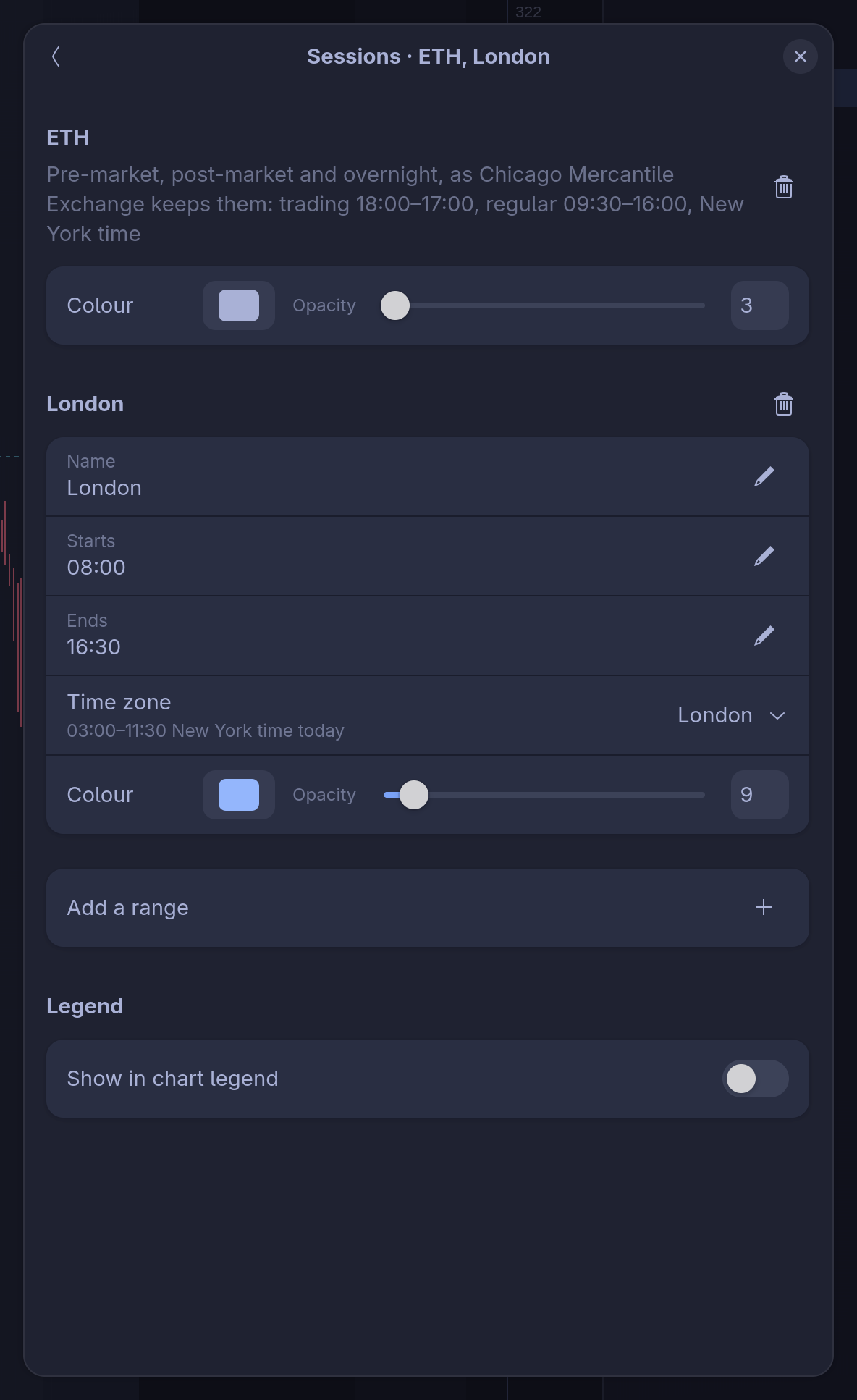
Each range is a group, titled with its name, with a bin in its header that removes it. The ETH and RTH groups say what they shade on this chart, such as as Chicago Mercantile Exchange keeps them: trading 18:00–17:00, regular 09:30–16:00, New York time, or why there is nothing to shade.
| Row | Default | Allowed |
|---|---|---|
| Name | The preset’s name | Any text. The legend lists it. Not on ETH and RTH |
| Starts, Ends | The preset’s hours | A time, typed as you like (Typing a time). Not on ETH and RTH |
| Time zone | The preset’s city, or Chart’s time zone for Custom | Chart’s time zone, or a named zone. The subtitle says what the hours come to on the chart today, such as 03:00–11:30 New York time today for London. Not on ETH and RTH |
| Colour | None, which shades the background, at 3% opacity for ETH and 9% for the rest | A palette name, or a custom colour. Default, first in its palette, goes back to none. Its Opacity is how solid the shading is, 0 to 100% |
The last group, Add a range, has a + that offers ETH, extended hours, RTH, regular hours, Asia, London, New York and Custom. ETH and RTH are greyed out once the list has them.
Session Times starts out of the chart’s legend. Legend › Show in chart legend, the last group, puts it there, labelled with its ranges, such as Sessions · ETH, London. Its settings open from its row on the Indicators page. Session Times takes no colour from the theme’s sequence.
Typing a time
Starts and Ends take a time however it is typed: 9, 930, 0930, 093000, 9am, 9:30pm, 9:30 p.m., 21h30 and 15:30 all work. The chart changes as you type. Enter, or leaving the field, writes the time back in the chosen time format. Text that is not a time is marked, and the chart keeps the last time that was.
See also
- Indicators
- Sessions, for Regular hours only
- Time, for the charts’ time zone and time format
- Session Times from the CLI